NO-CODE HMM WORKFLOW
Discover Protein Families. No Code. High Confidence.
HMM Discovery helps you build high-quality profiles from your sequences and search across curated databases to find distant homologs with confidence.
SensitiveDetect distant homologs
SpecificReduce false positives
CuratedSearch trusted resources
No CodeClick-and-go workflow
Example Protein Family Map
Query
Detected Domains
Unaligned
Query
Hit: WP_012345678.1
Hit: WP_098765432.1
Hit: YP_009876543.1
Hit: WP_045678901.1
Hit: WP_023456789.1
12505007501250
Amino acid position
Curated And Gut Viral Databases
Search trusted reference, ortholog, domain, and gut viral diversity resources
High-quality viral proteins with hierarchical clustering and annotations.
Search INPHAREDComprehensive bacterial, archaeal, viral, and eukaryotic proteins.
Search RefSeqOrthologous viral protein clusters with taxonomy and function.
Search VOGDBCurated protein domains and families with HMMs and alignments.
Search PfamGut Phage Database genomes for gut-phage diversity beyond standard references.
Search GPDLarge aggregated gut viral catalogue for broad environmental viral discovery.
Search GVD-AVrCGenome Neighborhood Context Beta
Example hit: WP_012345678.1
Query Hit
...
Reference (NC_012345.1)
...
Another Host (NZ_CP045678.1)
...
Distant Match (NZ_JR987654.1)
...
Conserved Gene
Query Hit
Other Gene
Built for Discovery. Designed for Confidence.
HMM Discovery combines profile HMMs with curated annotation and genomic context to maximize sensitivity without sacrificing specificity, giving scientists a smoother path from sequence to biological insight.
View Example WorkflowStartup Guide
From GitHub to a working no-code app: install once, launch the browser interface, run the synthetic demo, then move to real protein-family or single-genome analyses.
Start Locally With Conda
git clone https://github.com/mbaffour/hmm-discovery.git
cd hmm-discovery
conda env create -f environment.yml
conda activate hmm-discovery
./run_app.sh
Open http://127.0.0.1:8081. After the app is open, ordinary users work through the interface and do not need to write code.
Start With Docker
git clone https://github.com/mbaffour/hmm-discovery.git
cd hmm-discovery
docker build -t hmm-discovery .
docker run --rm -p 8081:8081 hmm-discovery
For lab or server use, mount a persistent project folder so runs survive container restarts.
First Demo Run
- Create a new project folder outside the Git repository.
- Load
example_data/demo_protein_family.fasta. - Run alignment, HMM build, and self-search validation.
- Export a ZIP to confirm reports and reproducibility files work.
First Real Run
- Load curated protein seeds for one family.
- Confirm clean alignment and seed recovery.
- Search fast protein databases first.
- Add INPHARED/RefSeq genomes, GPD, or GVD-AVrC only when the HMM behaves well.
Single-Genome Scan
- Register one nucleotide FASTA or GenBank file in Database Setup.
- Select only that custom target in Step 4.
- Use exhaustive six-frame ORFs for short, overlapping, or annotation-missed genes.
- Review coordinates, strand, coverage, and synteny placement.
Long-Run Advice
- Keep large runs outside the Git repository.
- Use cache cleanup after exports if disk space is tight.
- On macOS, use
caffeinate -dimsuduring overnight runs. - Save
RUN_SUMMARY.md,METHODS_TEXT.txt, andreproducibility.json.
Choosing Output Folders
- Use the sidebar project folder as the working analysis folder.
- Use Step 9's folder picker to browse and choose the final export ZIP destination.
- The default export destination is
~/Documents/HMM-Discovery-Exports. - For private data, choose a private lab folder or external drive, not the public Git repository.
Choosing Files And Folders
- Use Choose File or Choose Folder buttons for project folders, Step 1 inputs, custom databases, benchmark paths, synteny GenBank folders, and exports.
- Use the fallback navigator to browse Home, Documents, Desktop, project folders, parent folders, subfolders, and matching files.
- Typed paths remain available, but ordinary users should not need them.
Updating The App
- Pull the latest GitHub version, update the Conda environment, then restart
./run_app.sh. - Refresh
http://127.0.0.1:8081after the server restarts to see the newest interface. - No analysis code needs to be edited by users; updates are delivered through the app and docs.
Full reference: docs/STARTUP_GUIDE.md. The interactive version is in the guided tour.
Why This Matters
Protein-family discovery is powerful, but the workflow usually lives across scattered command-line tools. This app packages the full path into a guided interface.
No-code running
Users create projects, choose local FASTA/GenBank files or folders with Browse-style buttons, check/install requirements, build HMMs, choose databases, scan single genomes, generate summaries, clear caches, choose export locations, and package results without writing code.
Unusual ORFs
Six-frame mode scans stop-to-stop peptides in all reading frames so short, overlapping, or annotation-missed genes are not filtered out before HMMER sees them.
Reviewer context
INPHARED, RefSeq, GPD, GVD-AVrC, VOGDB, Pfam, synteny, motifs, clustering, and phylogeny help test breadth, specificity, and biological plausibility.
Reusable outputs
Export TSVs, GFF3, figures, methods text, run summaries, reproducibility JSON, presentation images, and a ZIP that can travel with the analysis.
Presentation Images
Reusable 16:9 workflow diagrams are bundled for talks, lab meetings, posters, and onboarding.
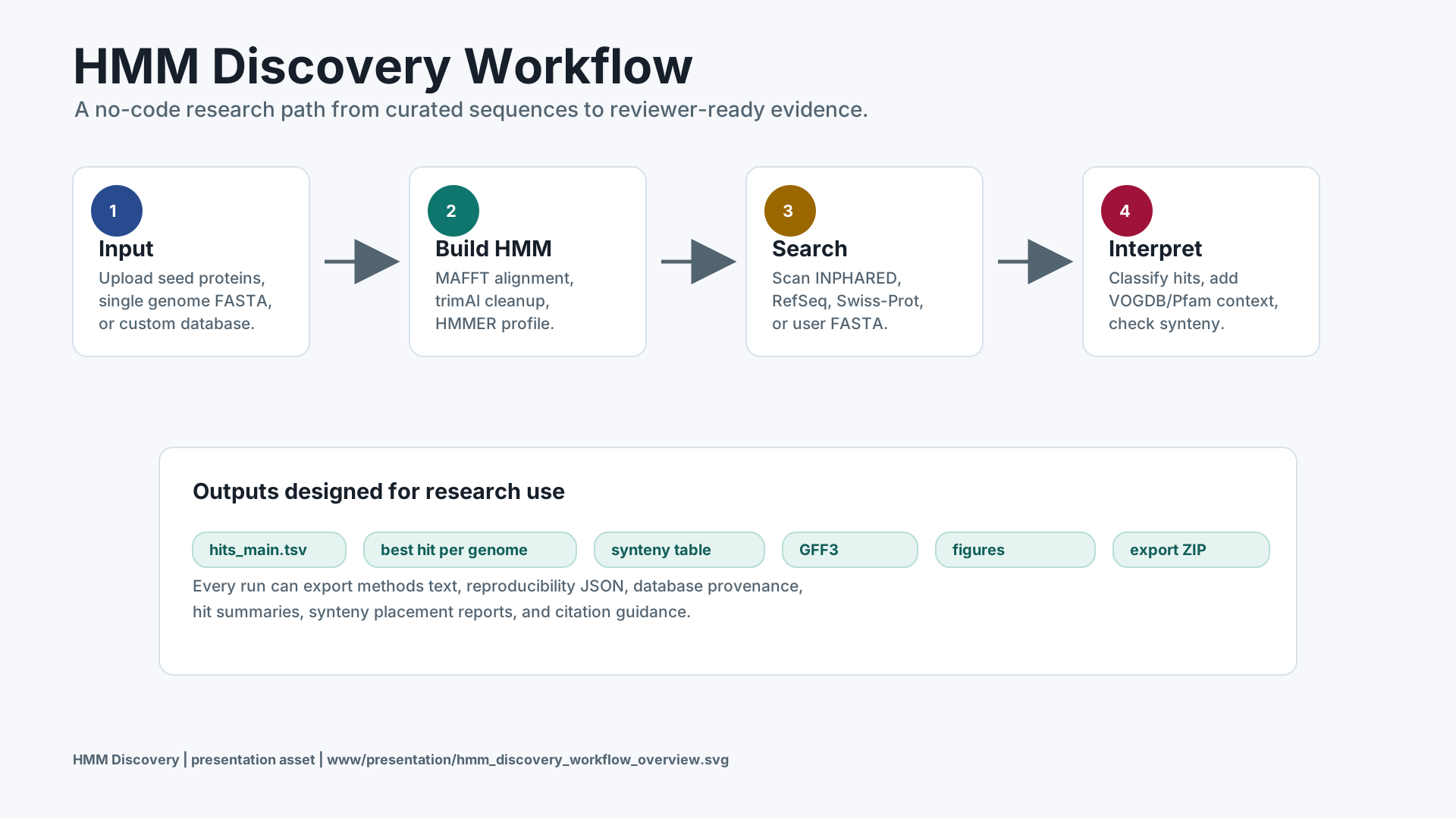
Workflow overview
Open SVG for the full HMM Discovery path from input to export.
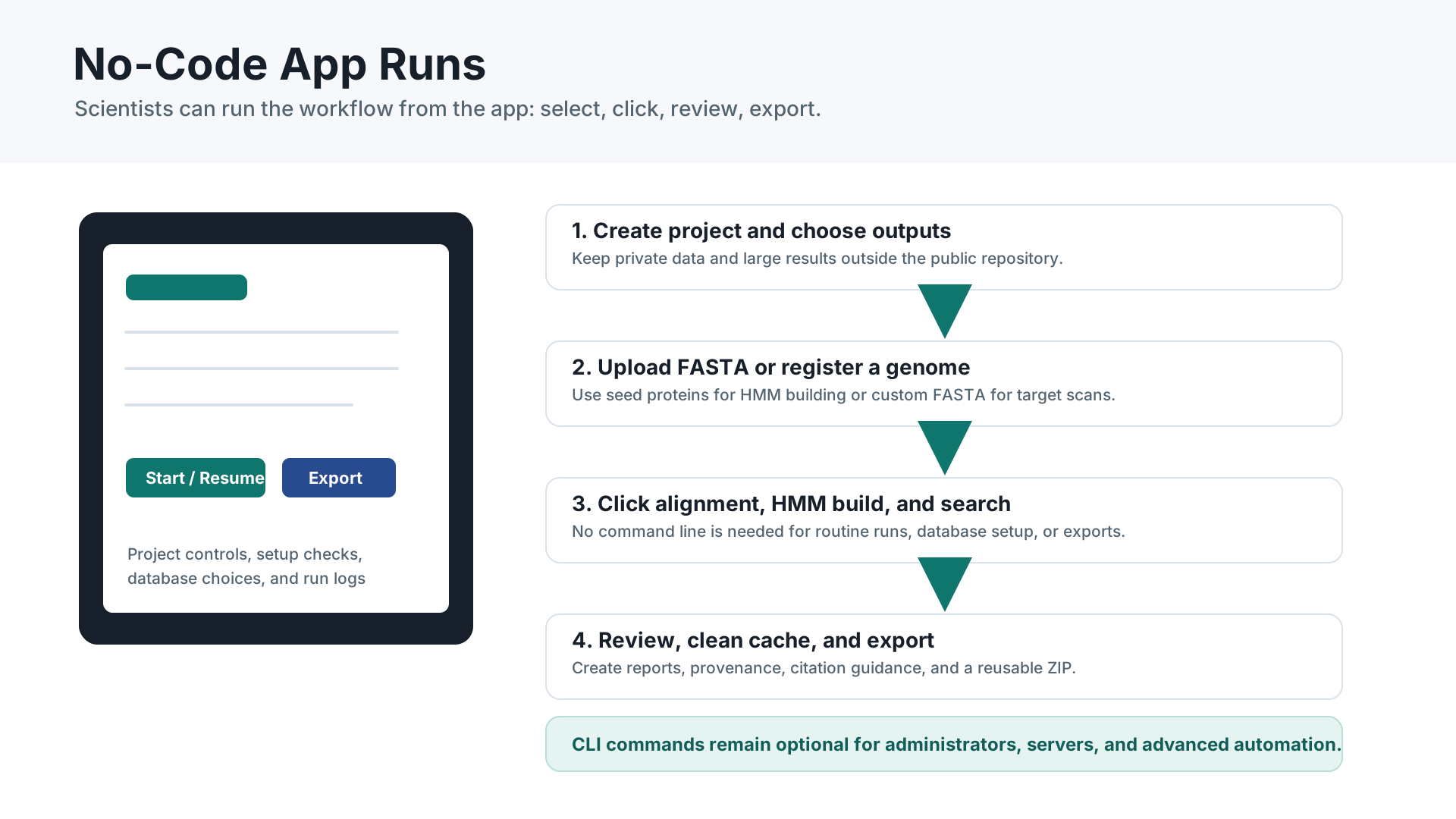
No-code user journey
Open SVG to show that users run the app by clicking through the interface.
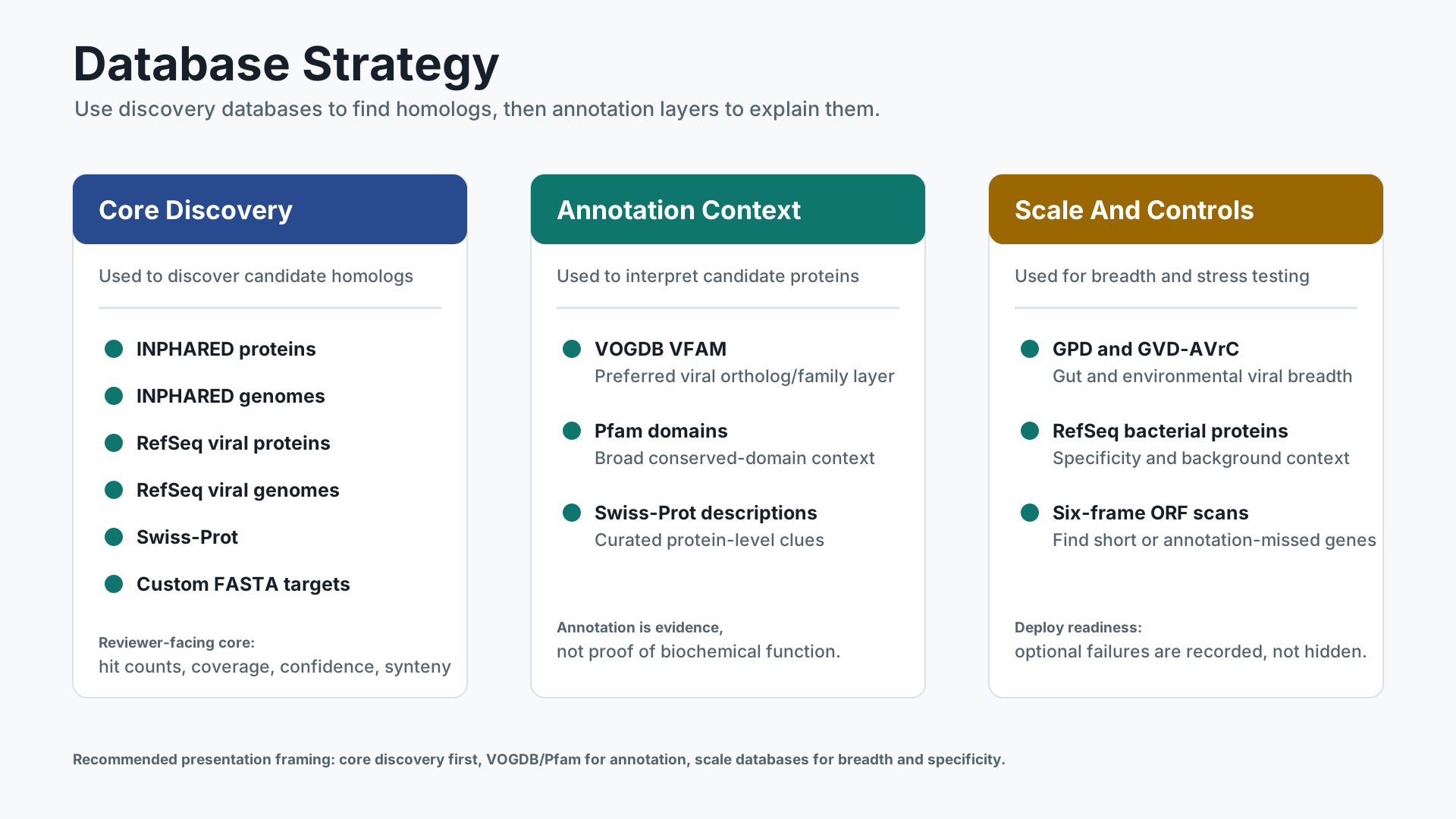
Database strategy
Open SVG to explain core discovery, VOGDB annotation, and Pfam domain context.
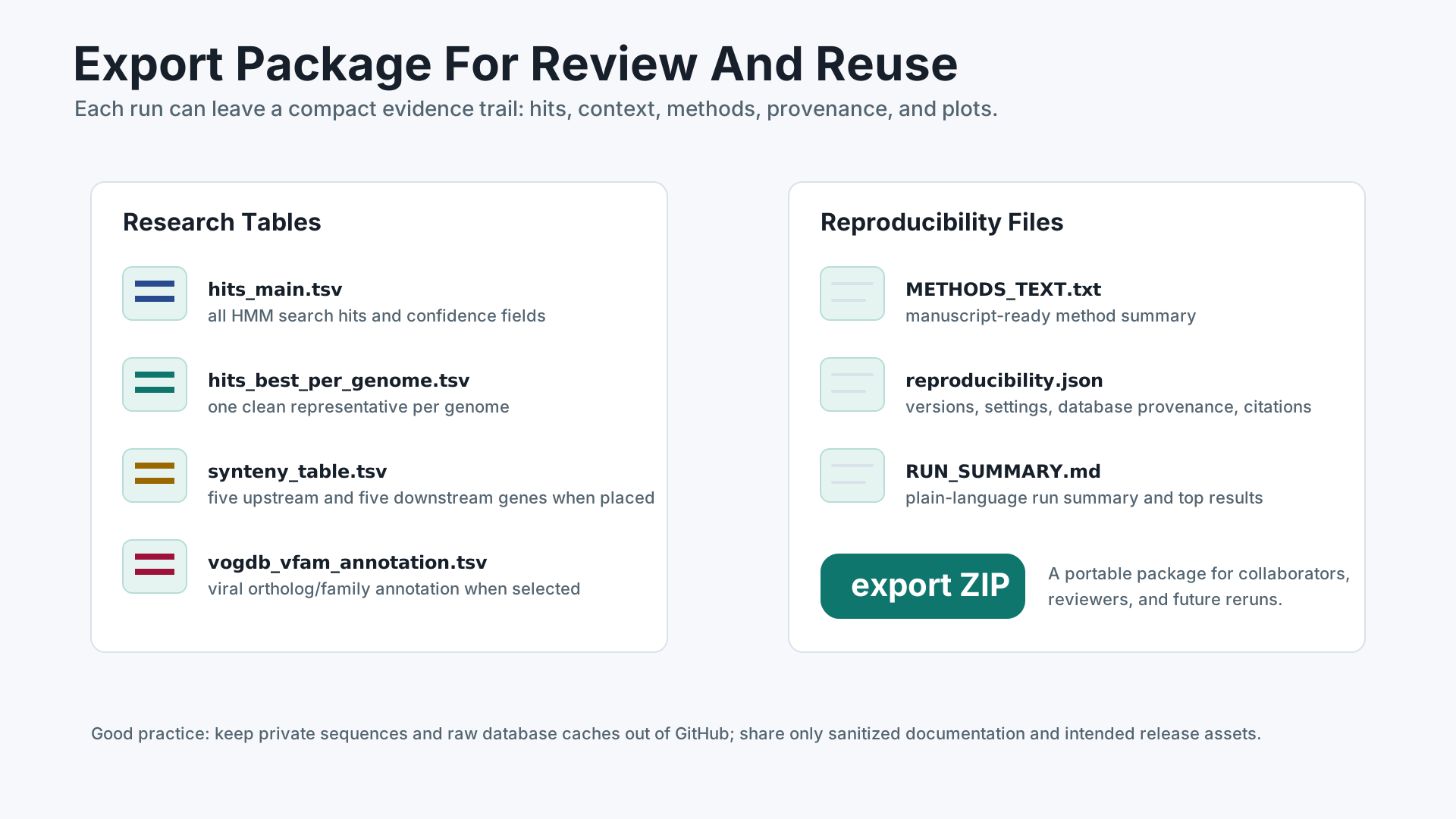
Outputs and reproducibility
Open SVG for methods text, run summaries, provenance, and export ZIPs.
No app can promise every bug is gone. The release is validated by compile checks, dry-run expansion, smoke tests, browser checks, and benchmark records; real user runs should still be treated as scientific analyses that need review.