Start with a clean demo run, then scale only when the HMM recovers seeds cleanly.
Quick Start
Conda
git clone https://github.com/mbaffour/hmm-discovery.git
cd hmm-discovery
conda env create -f environment.yml
conda activate hmm-discovery
./run_app.sh
Docker
git clone https://github.com/mbaffour/hmm-discovery.git
cd hmm-discovery
docker build -t hmm-discovery .
docker run --rm -p 8081:8081 hmm-discovery
Open http://127.0.0.1:8081, create a project, and load example_data/demo_protein_family.fasta.
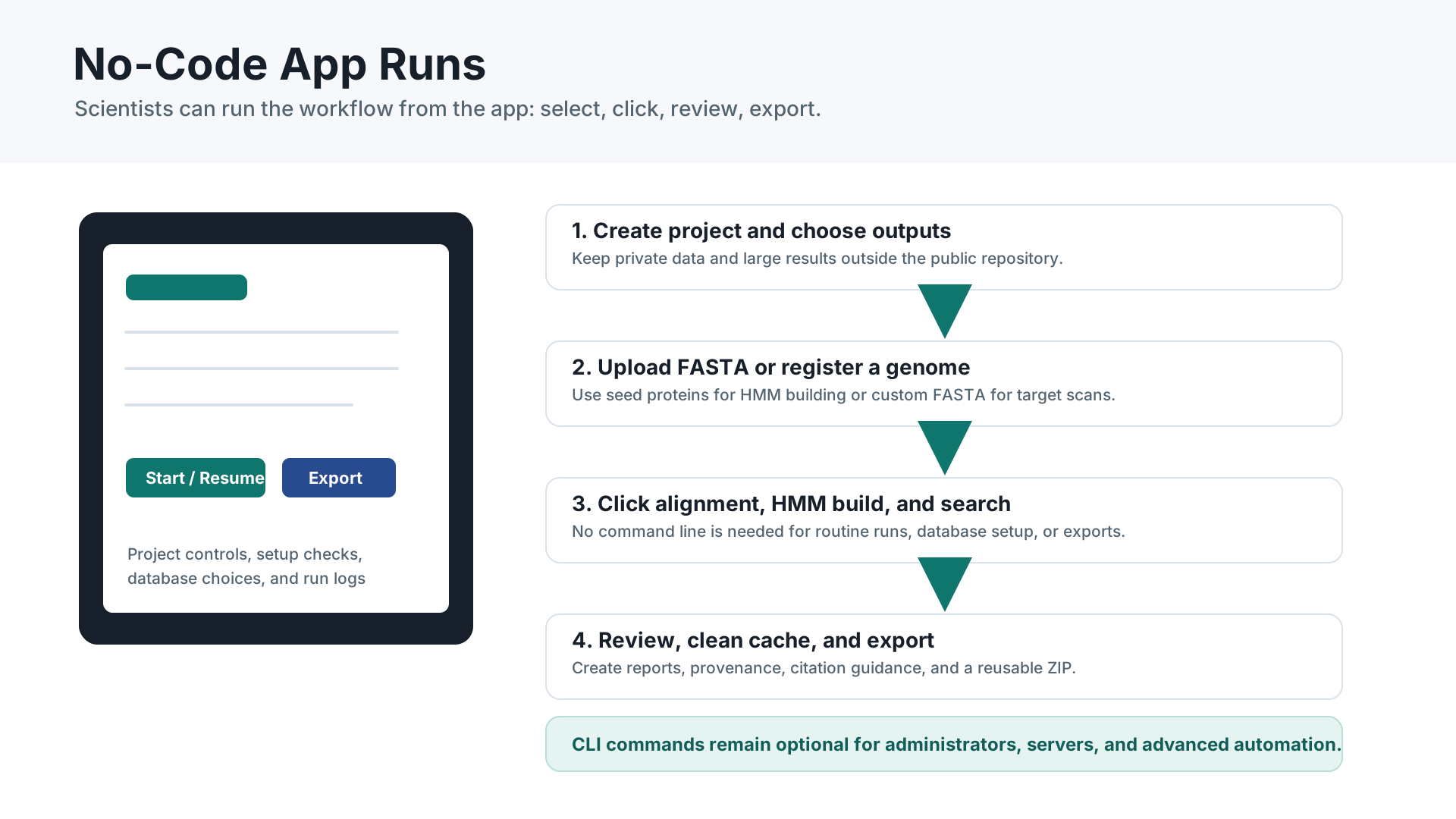
After launch, ordinary users do not need to write code. Project setup, input loading, HMM building, database selection, single-genome scans, six-frame ORF discovery, summaries, cleanup, and export are all available through the app interface.
Comprehensive Startup Guide
Use this when you are starting on a fresh computer, helping a labmate, or preparing a shared deployment.
1. Pick an install route
Use Conda/Mamba for a normal laptop or workstation install. Use Docker for a repeatable container deployment or shared server.
2. Launch the app
Run ./run_app.sh, then open http://127.0.0.1:8081. The public website cannot launch the local app by itself; the app starts from your machine or server.
3. Run the demo first
Create a project, load example_data/demo_protein_family.fasta, build the alignment/HMM, validate seed recovery, and export a ZIP.
4. Start small with real data
Load curated protein seeds, confirm the HMM works, then search fast protein databases before large genome or gut viral catalogues.
5. Single-genome scan
Register one nucleotide FASTA or GenBank file in Database Setup, select only that target in Step 4, and use six-frame ORFs when unusual genes matter.
6. Long runs
Keep the computer awake, watch disk space, export summaries, then clear cache files when the final report and ZIP are safely saved.
7. Output folders
The sidebar project folder is the working analysis folder. Step 9 has a folder picker plus manual path field for choosing where the final ZIP is saved.
8. File and folder picking
Every local file/folder path field has a Choose File or Choose Folder button, plus an in-page fallback navigator for project folders, Step 1 inputs, custom databases, benchmark paths, synteny GenBank folders, and exports.
Conda startup commands
git clone https://github.com/mbaffour/hmm-discovery.git
cd hmm-discovery
conda env create -f environment.yml
conda activate hmm-discovery
./run_app.sh
Updating an existing install
git pull
conda env update -f environment.yml --prune
conda activate hmm-discovery
./run_app.sh
After updating, restart the app process and refresh the browser tab at http://127.0.0.1:8081. Once the updated server is running, a normal browser refresh shows the new app.
Docker startup commands
git clone https://github.com/mbaffour/hmm-discovery.git
cd hmm-discovery
docker build -t hmm-discovery .
docker run --rm -p 8081:8081 hmm-discovery
Persistent Docker projects
mkdir -p projects
docker run --rm -p 8081:8081 \
  -v "$PWD/projects:/app/projects" \
  hmm-discovery
Keep macOS awake for long runs
caffeinate -dimsu
Stop it with Control-C after the run finishes.
Choosing files and folders without typing
Use Choose File... or Choose Folder... beside each path field to open the native local picker and fill the field automatically. The fallback navigator can browse Home, Documents, Desktop, the current project folder, parent folders, subfolders, and matching files. Click Use Selected for a file or selected folder, or Use Current Folder when the current folder itself is the destination.
Choosing where outputs go
Choose/create a project folder in the sidebar for the working analysis. In Step 9, use Choose final export folder (ZIP destination) and the built-in folder picker to browse Home, Documents, Desktop, the current project, parent folders, and subfolders. Click Use This Folder to fill the path, or create a new subfolder and use it immediately.
Full Markdown reference: docs/STARTUP_GUIDE.md.
Research Workflow
1. Input
Load a curated protein seed FASTA for your family. The demo FASTA is synthetic and only checks that the app works. Use the Step 1 file/folder picker if you do not want to type a local path.
2. Alignment and HMM
Run MAFFT, trimAl, and HMMER. Inspect seed recovery before searching large databases.
3. Search
Start with protein databases for a fast signal. For a single genome or bring-your-own FASTA run, register the target in Database Setup -> Add Custom Database / Single Genome Target. Nucleotide targets can be searched with Prodigal predicted genes or exhaustive six-frame ORFs.
4. Analysis
Review confidence tiers, clusters, motifs, taxonomy, phylogeny, and synteny.
5. Export
Generate a run summary, then download TSVs, figures, report HTML, methods text, reproducibility JSON, and the full ZIP. Step 9 can copy the final ZIP directly to a folder you choose, while the project folder remains the working analysis folder.
Database Strategy
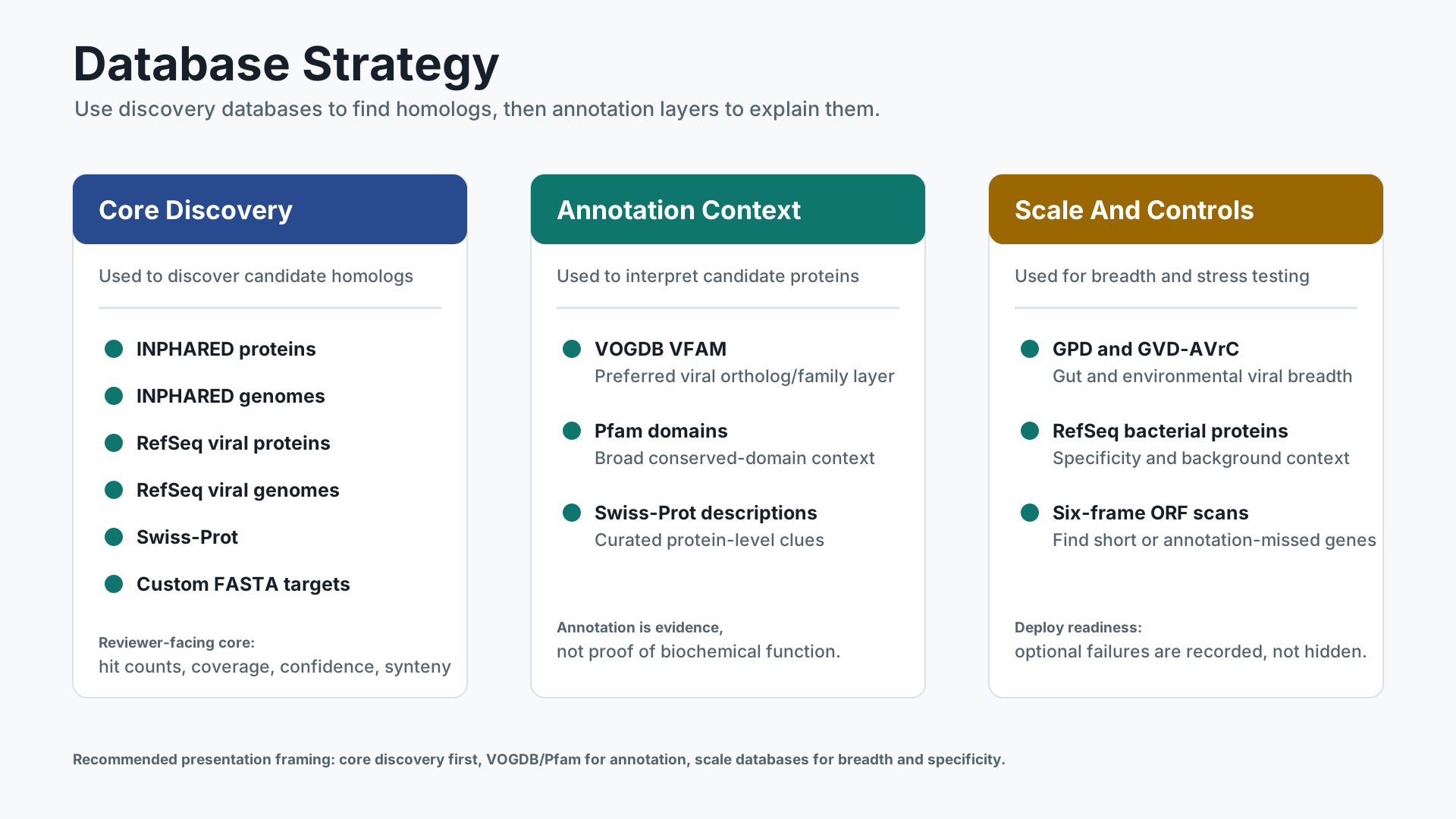
The app includes registry entries for public databases but not the database files themselves.
Fast check
INPHARED proteins and RefSeq viral proteins are good first searches.
Single genome target
Register one nucleotide FASTA as a custom database when you want to ask whether a specific genome contains the family.
Weird-gene mode
Use exhaustive six-frame ORFs for short, overlapping, noncanonical, or annotation-missed genes. Use Prodigal for faster conventional gene prediction.
Discovery run
INPHARED genomes and RefSeq viral genomes search translated proteins from nucleotide FASTA.
Gut Phage Database
Use GPD when your biological question involves gut phages or when reviewers may expect gut-viral breadth beyond curated references.
GVD-AVrC
Use GVD-AVrC for large-scale gut and environmental viral diversity. It is slower and larger, so run it after the HMM passes smaller checks.
Viral annotation
Use VOGDB VFAM for preferred viral ortholog/family annotation. It uses HMMER hmmscan and writes vogdb_vfam_annotation.tsv.
Reliability
Large public files are cached resumably before local search to survive network interruptions.
Gut viral breadth: GPD is useful for gut-phage discovery claims, while GVD-AVrC is the larger breadth check for gut/environmental viral catalogues. They are discovery databases, not replacement annotation layers; pair them with VOGDB/Pfam and synteny for interpretation.
VOGDB source: release 230 / RefSeq release 230, 39,585 VFAMs, https://fileshare.csb.univie.ac.at/vog/vog230/vfam.hmm.tar.gz and https://fileshare.csb.univie.ac.at/vog/vog230/vfam.annotations.tsv.gz.
Run Planner
Choose the smallest run that answers the question, then scale up only after the HMM behaves well.
Installation check
Run the synthetic demo FASTA through input, alignment, HMM build, self-search, and export. This confirms the app and environment are healthy.
Single-genome question
Register one nucleotide FASTA, select only that database, use exhaustive six-frame ORFs, and inspect coordinate-bearing hits plus synteny placement.
Fast biological signal
Search INPHARED proteins, RefSeq viral proteins, and Swiss-Prot. This is the fastest way to see whether the HMM has a plausible signal.
Reviewer-scale discovery
Add INPHARED genomes and RefSeq viral genomes. Use GPD/GVD-AVrC for gut/environmental breadth and RefSeq bacterial proteins for background specificity.
Do not start with every database unless you already know the HMM recovers seeds and the output disk has room.
Interpreting Results
What makes a hit convincing?
Look for a strong bit score, low E-value, good HMM coverage, recovery of expected seed behavior, consistent database context, and a genomic neighborhood that makes biological sense.
What if six-frame finds hits Prodigal missed?
That is expected for short, overlapping, noncanonical, or unusual genes. Treat the hit as a candidate and inspect coordinates, strand, coverage, synteny, and translated peptide length.
What should I cite?
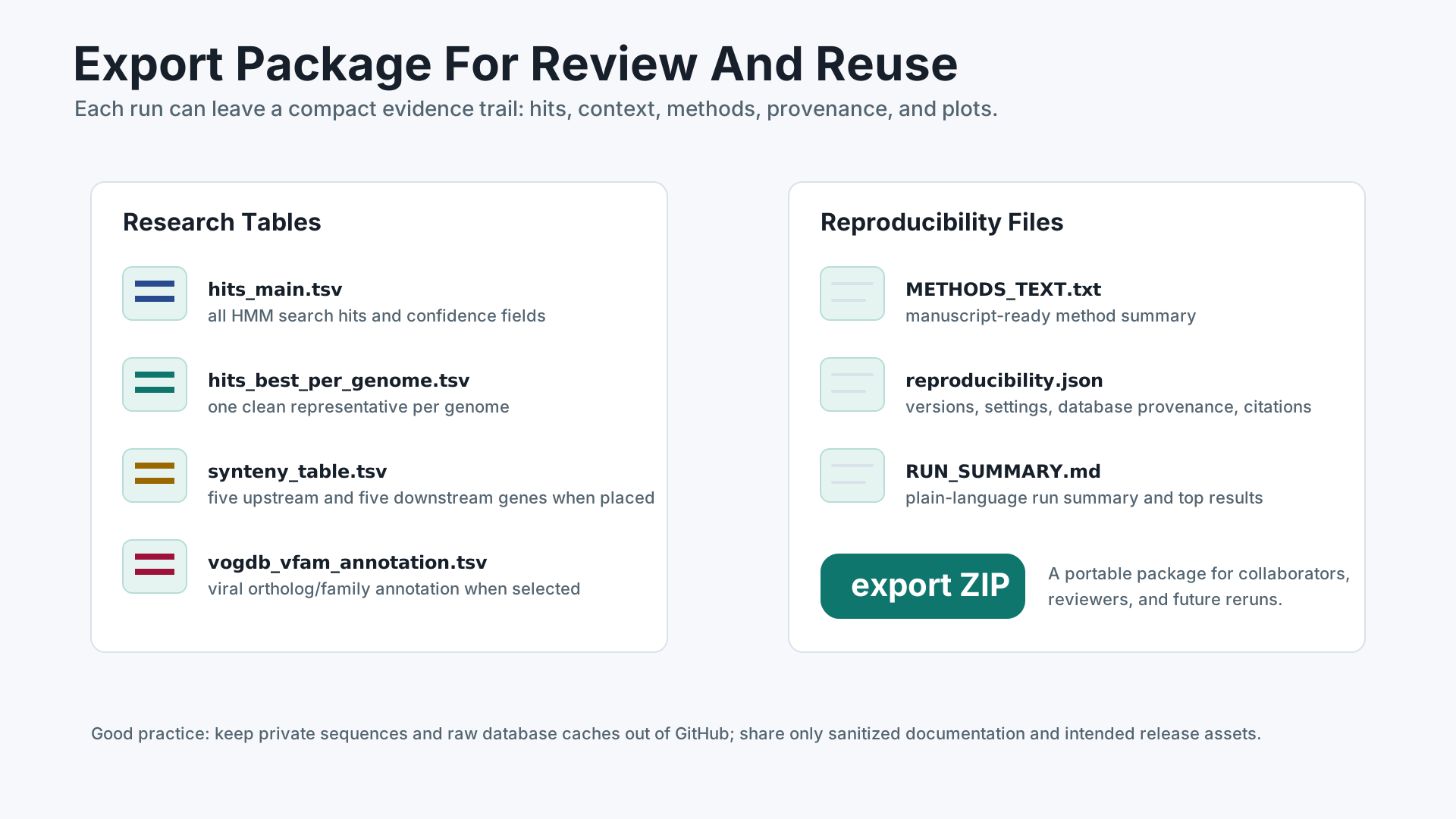
Cite HMM Discovery plus every tool and database selected in the run. Use ACKNOWLEDGEMENTS.md, CITATION.cff, METHODS_TEXT.txt, and reproducibility.json.
What should I not overclaim?
Annotation databases suggest family/function context but are not proof of biochemical activity. Borderline hits still need review.
Synteny Outputs
Synteny aims to place each hit and recover five upstream and five downstream genes.
synteny_table.tsvfor spreadsheet and custom plotting workflows.synteny_neighborhoods.gff3for genome visualization tools.synteny_placement_report.tsvfor diagnosing unplaced hits.
For unpublished genomes, keep project folders private and do not commit outputs.
Presentation Images
Use these 16:9 diagrams in slides, posters, lab meetings, onboarding, or a project website. They contain no private research data.
Workflow overview
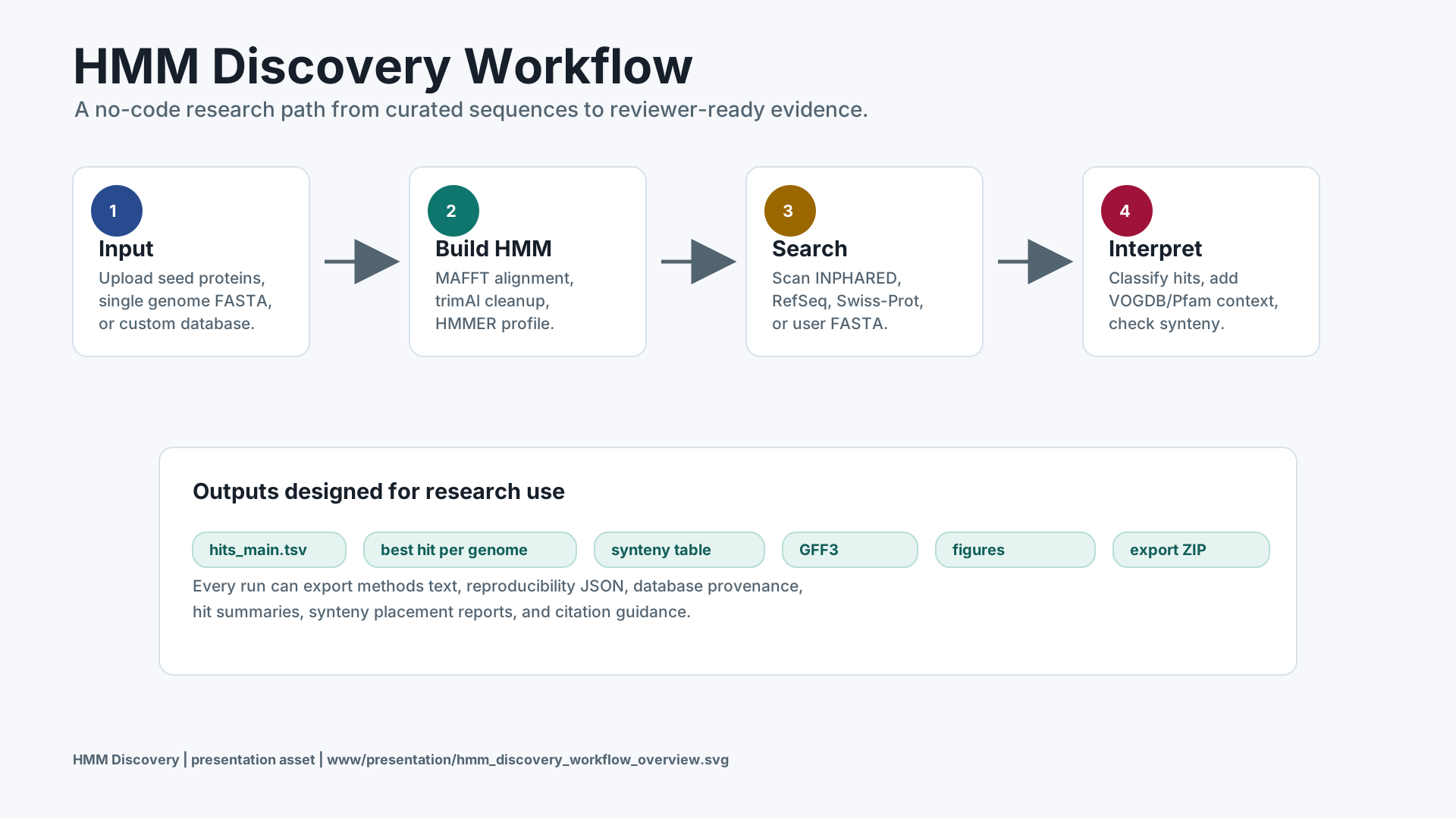
No-code user journey
Database strategy
Outputs and reproducibility
SVG files are best for crisp scalable slides. PNG exports are included when the local renderer is available.
Deployment Notes
Single lab machine
Use conda or mamba, launch with ./run_app.sh, and keep project directories on a large local disk.
Shared server
Run behind institutional authentication and mount a persistent project volume.
Container
Use the Dockerfile for reproducible installations across devices.
All-Database Validation
In the app, open Database Setup and expand All-Database Research Validation. Use Dry-Run Expansion first, then Start / Resume. The app displays the manifest, PID, per-database status, and live log.
For nucleotide databases, use exhaustive six-frame ORFs for discovery validation. Prodigal is available as a faster conventional annotation baseline, but it can miss the weird genes this tool is designed to find.
After a run, open Step 9 -> Run Summary to create RUN_SUMMARY.md and run_summary.json with inputs, settings, database statuses, hit counts, confidence tiers, synteny status, and key output files.
A release is core-discovery ready when required discovery databases pass and optional annotation databases are recorded as complete, failed, skipped, or partial with a clear reason. VOGDB VFAM is the supported viral ortholog annotation route.
For methods and citation hygiene, include the repository citation plus every tool and database selected in the run. The release bundle includes docs/METHODOLOGY.md, ACKNOWLEDGEMENTS.md, and CITATION.cff, while run exports include METHODS_TEXT.txt and reproducibility.json.
Seed/input FASTA files are not auto-registered as databases; the registry contains public databases plus only custom databases a user explicitly adds.